
Flux.2 Klein - Shrinking Flux.2 Dev
Following in the steps of Z-Image Turbo?


Flux.2 Dev is a beast of a model and way too big to run on most consumer hardware at any reasonable speed. Who knows whether Black Forest Labs were seeing the success of Z-Image Turbo (ZIT), a small and fast, yet very good model, and decided to do something similar, or whether it was always in their plans, but the end result was the same - a much smaller and considerably faster model based on Flux.2 called Flux.2 Klein (F2K)
Flux.2 Klein isn’t just one model, there are four different versions. There are two 4 billion parameter versions comprising of a base model and a 4-step distilled version. Alongside these are two 9 billion parameter models, again consisting of a base model and a 4-step distilled version. The 9B models are 18.2GB in size, the 4B models are 8GB in size, which sit either side of the 12GB size of the Z-Image Turbo BF16 model which is 6 billion parameters.
I run the ZIT BF16 model on my 4060Ti 16GB card, taking around 90 seconds for a base image typically using 8-10 steps. I can run the F2K 4B models direct in BF16 format, however, I have opted to run the F2K 9B models, for which I have used a Q8 GGUF version.
Although the base models are aimed at training and tweaking, I have seen some reports which suggest the quality of the base model is better than the distilled version. I have not seen this, in fact I have found the base model has given some poor output and I cannot work out why. For the tests here I have used the distilled model, primarily so that it is a closer comparison to ZIT, which is also distilled.
Although the 4B and 9B parameter models are closely related they do use different text encoders. The 4B model uses the Qwen3 4B text encoder (similar to ZIT), whereas the 9B model uses Qwen3 8B text encoder. QI2512 for comparison still uses the Qwen2.5 7B text encoder. This newer, larger model for F2K should in theory offer better text encoding.
I normally use the ComfyUI Desktop version, however, at the time of writing I could not get Flux.2 Klein to work on the desktop version. I suspect this is due to the desktop version lagging the portable version in terms of release. The ComfyUI Portable version does work correctly, assuming it is up to date on the latest version (at least 0.9.2)
Workflow
The ComfyUI documentation has links to models, text encoders and the VAE required along with a basic workflow. The packaged workflow produces some OK output but is quite restrictive due to its use of the advanced sampler with a Flux.2 Scheduler.
I switched to the ClownShark K-Sampler but kept the Flux.2 Scheduler. I have tried runs with the Flux.2 Schedular enabled and bypassed and so far have found it better enabled.
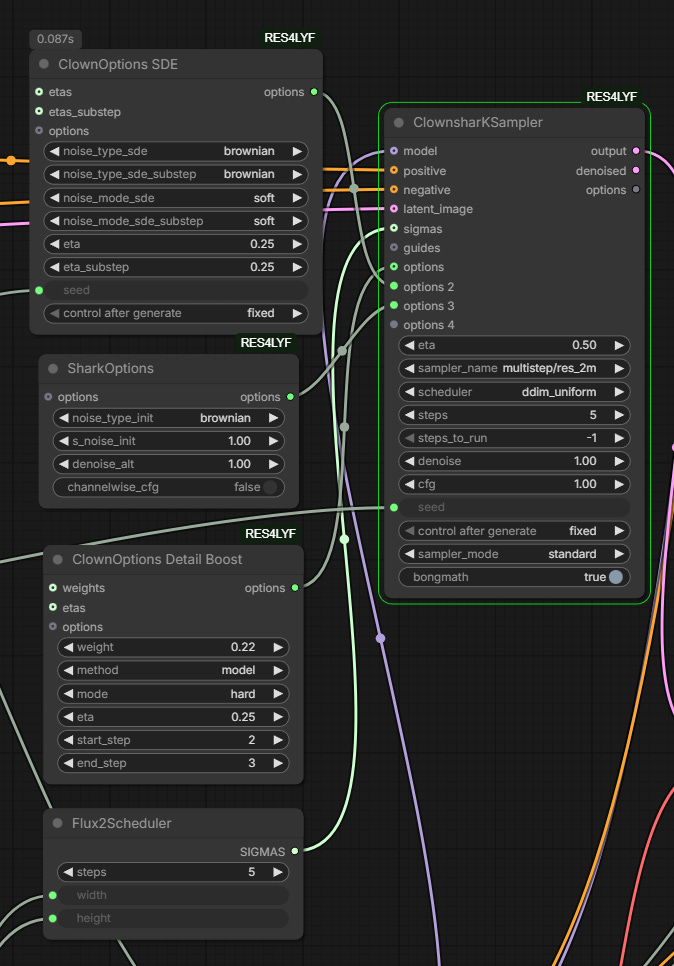
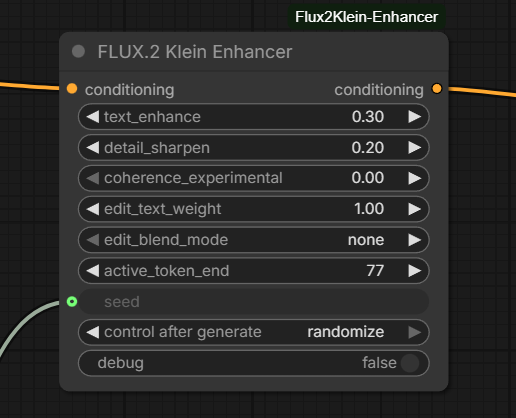
I typically have used 5 steps rather than 4 as the output seems to be better, I’m not sure if this is side effect of using RES4LYF. I have also added the Flux2Klein-Enhancer node. This is a very recent node which controls prompt adherence and image edit behaviour by modifying the active text embedding region. There is a lot more information and some examples on the GitHub page but in testing it does seem to to improve things.
There is no doubt that F2K even in 9B format is fast. Using 6-8 steps I am seeing base images in less than 2 minutes, dropping to around 60 seconds if you use just 4 steps, making it similar or quicker than ZIT in some cases.
Although I often use 2-stage sampling for ZIT and LoRAs or checkpoint versions, for the purposes of this post both the ZIT and F2K images are straightforward workflows so that the raw output can be compared.
It is worth noting that with distilled models the CFG (Classifier Free Guidance) value has to be kept at 1, reducing prompt adherence control. The distilled models also do not work well if you use too many steps. A 4-step model may work OK at 5 or 6 steps but as you go higher the quality will generally reduce.
Photo Realistic Images
Early testing suggests Flux.2 Klein 9B is good with prompt adherence, a little better that Z-Image Turbo and can produce natural compositions.


For these two examples I think F2K comes across strong, with a realistic feel and good face detail. ZIT can produce good realism but I often find it takes a few iterations and changing sampler settings. In both of these cases the prompt adherence is better with F2K too.
In terms of sampler/scheduler for F2K I used res_2m/ddim_uniform, whereas with ZIT I was using ralson_2s/simple. With ZIT in particular you seem to need to vary settings far more frequently, F2K tends to be more consistent.
I often use ZIT with a LoRA for realism and I also wondered how well F2K compares to Qwen Image 2512.


This was an interesting comparison, prompt adherence was strongest with F2K, with ZIT second and QI2512 last. This surprised me as I generally find QI2512 very strong on prompt adherence. In this case I thought the F2K image was a little waxy on the skin, the LoRA with ZIT improved its output, although perhaps went too far towards a soft airbrushed look. QI2512 produced I think the most realistic and detailed image in this case, showing how much the 2512 version has improved on the original.
In this case the workflow for QI2512 was using a dpmpp_2m/bong tangent sampler/scheduler combination with 20 steps, so you have to bear in mind that the QI2512 output takes considerably longer than ZIT or F2K, a reminder of how impressive the F2K and ZIT models are producing this quality at 4 and 8 steps.
I have been a big fan of ZIT for photorealism since it appeared last October, even adding it to Qwen Image workflows as a second stage. That said, I have frequently used it with a LoRA or utilising a checkpoint version to get the extra realism. ZIT though has its moments with prompt adherence and composition.
Today whilst creating the headshot above I had to restart ComfyUI after every few image generations because ZIT would start producing very random output. After restarting it would be fine again for a while. The odd thing was I could switch to another model and it would be fine, it was only ZIT which had the problem.
F2K has been more consistent with prompt adherence and composition, and when comparing raw F2K with raw ZIT I think F2K may better it, which means once we start to see checkpoints and LoRAs it could step ahead.
Qwen Image 2512 is an unfair comparison, it’s a model considerably larger and slower than ZIT or F2K so it should be better. Maybe that is not so obvious on relatively simple images but once things get more complicated it pulls ahead. Flux.2 Dev is possibly another step further on (although not necessarily on the realism side) but it is just too big and slow to use productively on most consumer hardware at the moment.
Anime
The style range of anime is obviously very wide so for brevity I will just cover semi-realistic style.


F2K does a better job of the semi-realistic style, ZIT goes for a weird mix of illustration in some areas and more photo-realistic in others, it was, however, better at prompt adherence in this case. F2K took several attempts to even get close and this is an issue I have seen with F2K on other anime images, the prompt adherence and composition goes awry. Why it should do this in particular with anime I have no idea.
Anime is where a LoRA can really help, in these next examples I used the Hyper Detailed Illustration LoRA, using the specific version for each base model. LoRAs are still scarce for F2K so there isn’t an F2K example.


In the case of ZIT it makes a big difference, for QI2512 it had less of an impact (even when running it with a higher strength). I like the output but it is closer to stylised realism than semi-realistic.
So again with raw output F2K edges ahead of ZIT but the odd prompt behaviour is a concern. Once anime LoRAs appear for F2K it should produce some really interesting output.
Art Styles
For small distilled models I do not expect too much as we move into artistic areas, certainly not without the addition of LoRAs.


F2K actually does a reasonable job, ZIT less so. Neither are great compared to models like Flux.1 Krea or Qwen Image.
F2K though is both a text-to-image model and an image edit model so I thought I would try editing a realistic version of the image above and converting it to a water colour. I added a description of the style I wanted in the image prompt and gave it the reference image.


The result is quite different in styling from the first example, that could partly be down to the way I described the style in the image prompt but I think the ‘edit’ approach is doing something a little different. It’s great to have another option within the same model. I haven’t spent time yet testing the edit feature of F2K, I’m still experimenting with Qwen Image Edit 2511!
Summary
Flux.2 Klein is still very new and will take some time for everyone to find the best settings and prompt structure (note: there is a good guide on the Black Forest Labs website) but it shows great promise.
I am finding F2K more consistent than ZIT, provided you do not push it too far in terms of prompting. Hopefully LoRAs and checkpoints will be forthcoming to extend and improve its capabilities. Overall I would not say the output of F2K is vastly superior to ZIT, they each can produce very good output, and currently with the large array of LoRAs available for ZIT it is very flexible, but they will balance out over time.
Compared to ZIT Turbo I am finding less variance across samplers and schedulers. There are differences but they seem less pronounced than with ZIT, where a different sampler can vastly change an image and impact its quality.
F2K is not a replacement for the bigger models like Qwen Image, but its speed and quality makes it very attractive for rapid development. For the moment F2K will sit side by side with ZIT for me but it could become my favoured rapid model as checkpoints and LoRAs appear.