
USO (Unified Style-Subject Optimized) Model
ByteDance's approach to style transfer and subject consistency

The USO (Unified Style-Subject Optimized) Model has been developed by ByteDance’s UXO team, yes that is ByteDance of TikTok fame. It appeared a couple of weeks ago and soon had native ComfyUI support, but amongst all the noise of the diffusion model world it was easy to miss.
It is also quite hard to work out what exactly it is, being described as subject-driven and style-driven it sits somewhere between Flux.1 Kontext, a ControNet and an IPAdapter.
First off it isn’t a full model, it comprises a LoRA, a model patch and two custom nodes - USO Style Reference and USO Reference Conditioning. It is designed to use the Flux architecture using Flux.1 Dev as its base model along with standard Flux text encoders and VAE. It also uses the sigclip_vision_patch14_384 CLIP vision model.
The ComfyUI documentation has all the details for the model downloads and some example workflows. Their documentation says:
“The model achieves both style similarity and subject consistency through disentangled learning and style reward learning (SRL).”
I thought disentangled learning might be marketing gibberish but after a Google it seems it is a real machine learning concept, but I am none the wiser as to how it works.
So what does it actually claim to do? There are three main modes:
Subject-Driven: Place subjects into new scenes while maintaining identity consistency
Style-Driven: Apply artistic styles to new content based on reference images
Combined: Use both subject and style references simultaneously
The workflows are similar for all three, with just nodes bypassed if you do not need either the subject or the style references.
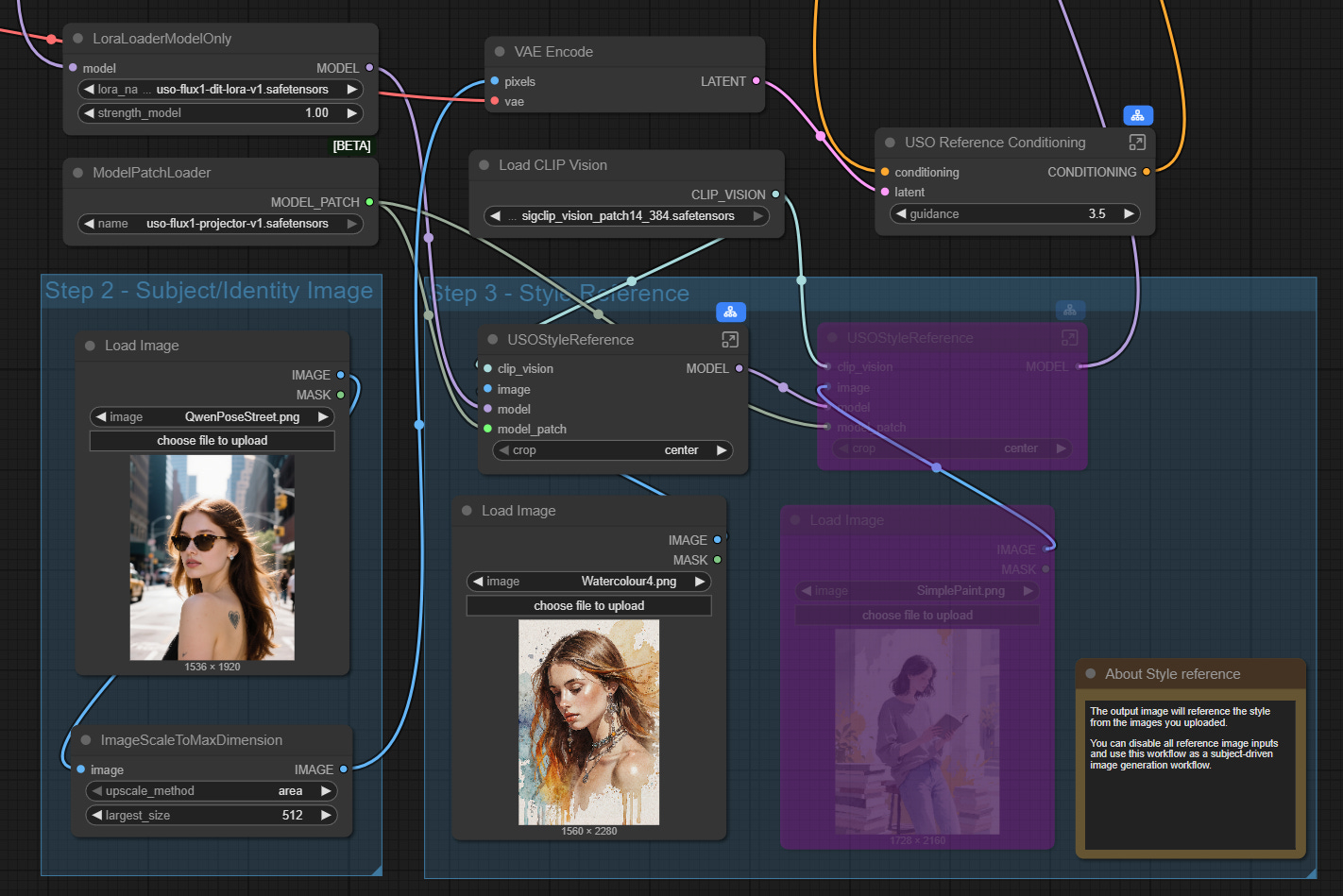
Subject & Style Reference
The first test uses the two images shown in the workflow above with a very short text prompt requesting a ‘semi-realistic digital image’ with three different strengths.


The first two results see a reasonable influence from the style image but by the time the strength is reduced to 0.6 only the subject is maintained and an entirely new background is added. I think in this test the 0.75 strength is the best but switching samplers and using different seeds can produce quite different results with the only conclusion being that the impact of the style reference drops rapidly below a strength of about 0.75.
Officially USO is aimed at Flux.1 Dev but as Flux.1 Krea and Flux.1 Kontext share similar architectures I wondered what the results would be if I switched the model. First up Flux.1 Krea.


The output is interesting, it does work but in a rather abstract, creative way. Once again as the strength is lowered below about 0.75 the image composition varies considerably from the source.
I had no idea what to expect from Flux.1 Kontext.


The result is interesting, at a strength of 1 the character is maintained but with a strong anime style, the background has a small element of the style image. Once we drop to 0.75 strength the character has become even more anime styled but maintains aspects of the original character. The background though has gone off in a new direction.
Subject Only Reference
By bypassing the four nodes in the style reference section of the workflow you get a subject only workflow which, in theory, allows you to change the background of the subject, and possibly change attributes of the subject whilst maintaining some consistency. This is straying into Flux.1 Kontext and Qwen Image Edit territory where both of those models already offer good solutions so I am not sure I see this being very useful.
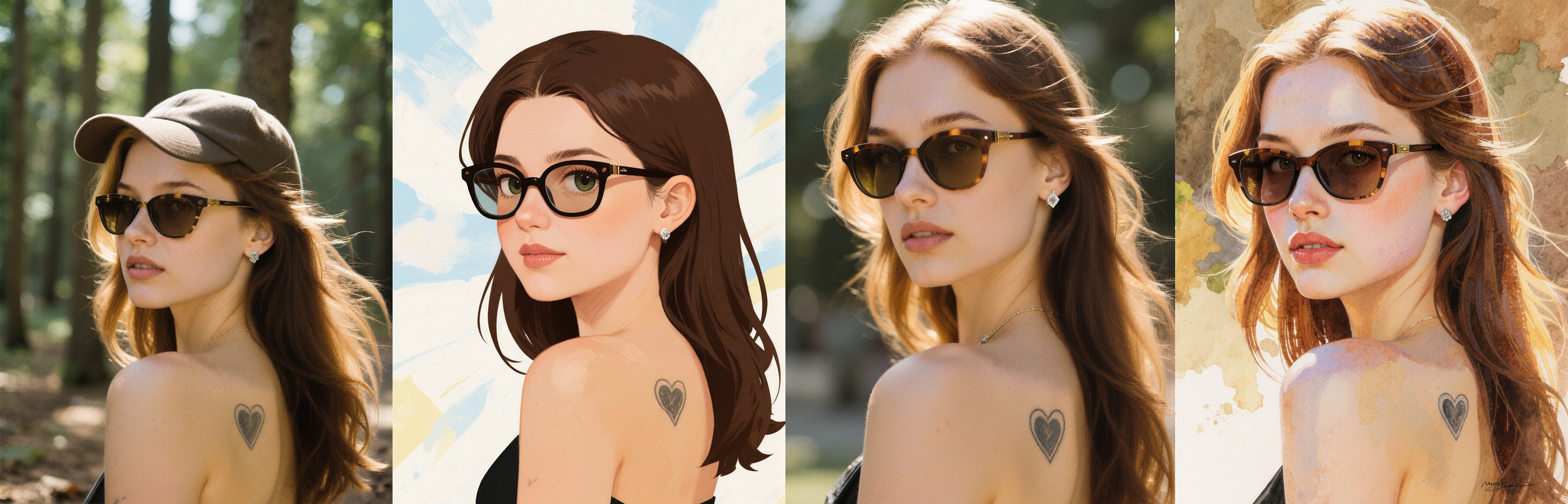
Using the same subject image as previously but with a text prompt to change the setting to a forest, and then in the second case some additional changes, the following is achieved.


To be fair the background change is pretty good, I don’t think it is as good as Flux.1 Kontext or Qwen Image Edit in terms of adjusting the light and making the subject ‘fit’ in the new setting but it is a reasonable effort.
Making changes to the character is less successful, a baseball cap addition has worked but the change of hair colour to blonde is missing completely.
If we run the same workflows but with Flux.1. Krea the output looks as follows.


With the background only change the Krea image has given more detail to the forest background but the overall quality of the image is poor. I have seen this issue in other situations with Krea, for example with some LoRAs and certain custom nodes such as HiRes Fix. Flux.1 Krea maybe based on the Flux architecture but there clearly are differences which make it incompatible with some Flux tools.
The second image has got the blonde hair but the sunglasses have been dropped and subject composition has changed.
For subject only I don’t really see a use for USO model when Flux.1 Kontext and Qwen Image Edit are more powerful, the only reason is possibly the fact it is less resource hungry than those models as it is primarily a LoRA.
Style Only Reference
For the style only approach the workflow is a little simpler as no subject reference image is loaded and VAE encoded. In these tests I will just use one style reference but you can use multiple images.
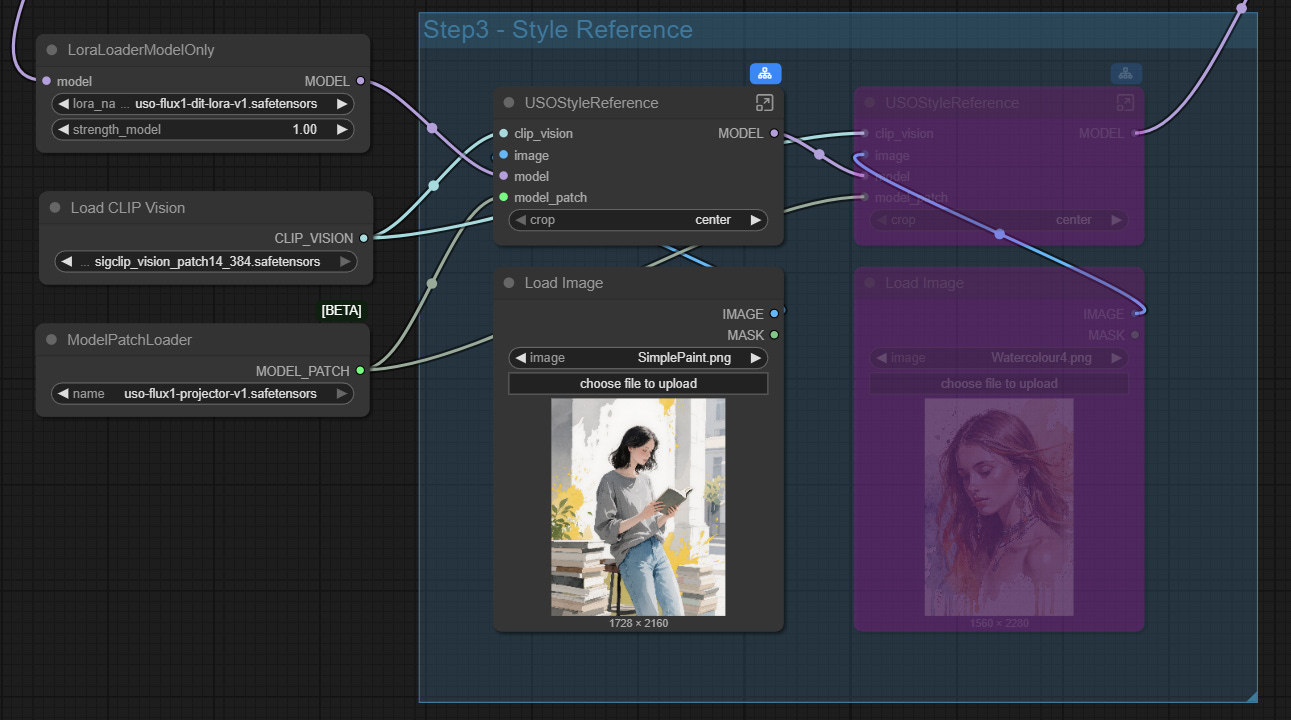
In this case the composition of the image comes from a normal text prompt so for comparison the first image below is the output without the style reference, the second and third images use the style reference as shown above.


It is clear the style reference is having an impact and as you reduce the strength it starts to move back towards the original. I think in some cases the result of style only is better than the style+subject in terms of the style transfer, perhaps because there can be a conflict between the subject image style and the style reference in terms of which takes precedence.
As a comparison I created the very basic image below with a standard text prompt with Flux.1 Dev with no style or subject transfer to use as the source.
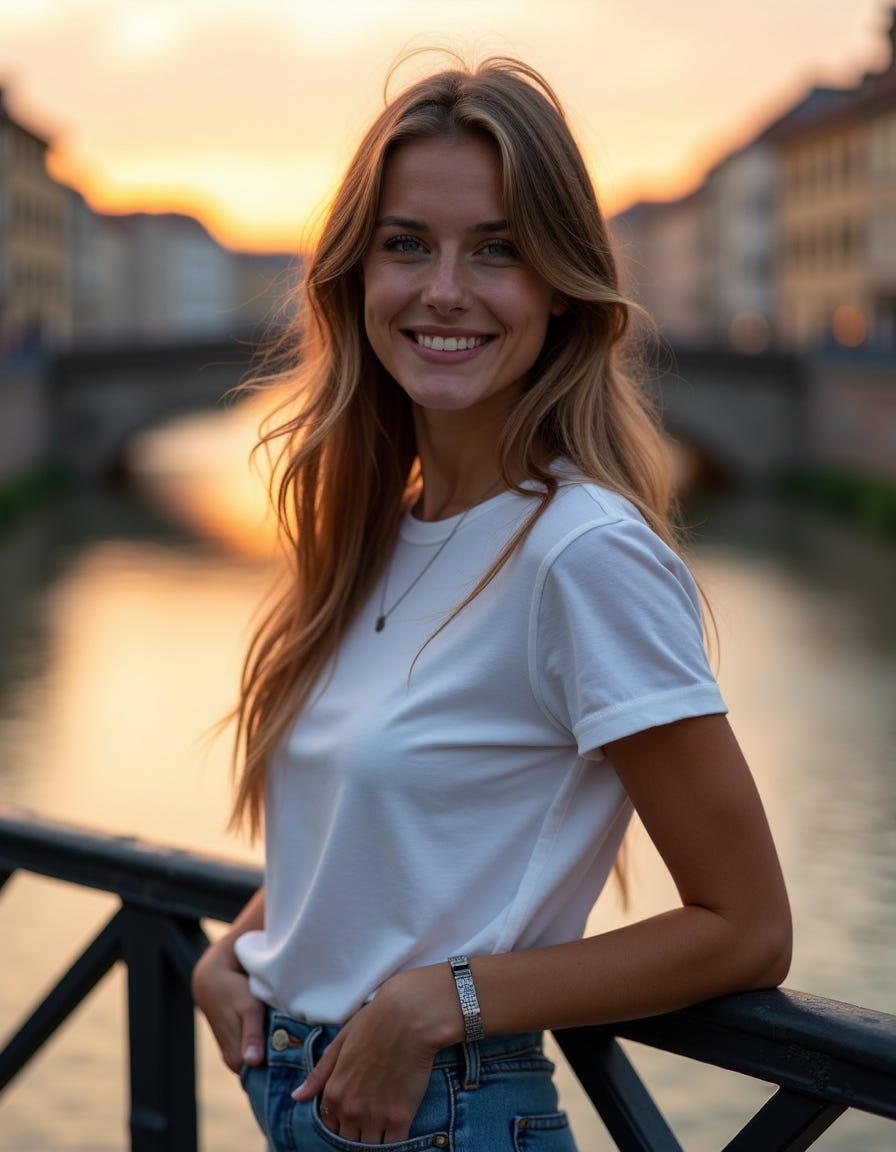
In the images below the first image uses the output above as the subject image, with the same text prompt and a new style applied. The second image uses the original text prompt with just the new style applied based on Flux.1 Dev. The third image is the same but using Flux.1 Krea as the base. The fourth image is the style reference. The seed and other parameters are the same in all cases.


There is certainly a difference in the way the style reference is being applied when it is combined with the subject prompt, it looks to be weakening the impact, with the variance across styles less pronounced.
With the Style only you can see that the USO model patch is changing the composition as the second images should be very similar to the first as all the other parameters are the same.
Although the style reference does change the image style, the interpretation of the style is fairly loose, certainly when it comes to colour. This is particularly evident in the last set where the reduced colour palette has not really come across at all. Pushing the strength higher than 1 does not help, the image just rapidly deteriorates into a mess. In most cases I have found the best setting for the strength when just using a style reference is around 0.75-0.8, there are exceptions though, when going to 1 produces a better output.
Switching in Flux.1 Krea produces some interesting results, almost a lottery as to what you get from the style reference, sometimes producing a really nice creative output. In some cases the Krea version is a better reflection of the style than the Dev version. Often though the output is garbled reflecting again that it wasn’t designed to work with Flux.1 Krea.
I did try a couple with Flux.1 Kontext but it just seems to ignore the stye completely and create a new image.
Summary
The USO model is an odd one, it may technically be interesting but in terms of using it for output the overlap with Flux.1 Kontext or an IP Adapter is significant and in a lot of cases it does not produce an output of the same level.
The variety of the style is not as strong as I would have hoped, IP Adapters seem to provide more range and better adherence to the style reference. The subject reference works fairly well but doesn’t provide you with much scope to change the composition in the same way as Flux.1 Kontext or Qwen Image Edit.
Having said that, the USO model is much lighter than Flux.1. Kontext. On my RTX 4060 Ti OC with 16G VRAM each step is only taking 3s. It is quick and easy to use and for some images the style transfer produces great results.
Switching the base model to Flux.1 Krea is unpredictable in terms of output but can generate really creative results if you have the patience to try a number of iterations and settings.
It will be interesting to see if ByteDance develop a version to work with the Qwen Image model or evolve the Flux version further creating better compatibility with Flux.1 Krea. Currently the USO Flux Model isn’t one I am likely to be using frequently but it is also one that I will not be discarding.